Product vision · Impuls.cat

The company operating systemfor the age of agents

Move on with the arrow keys, the wheel or a swipe

Eight hours a day driving software.

Today, people are the integration: they carry data from one screen to the next to make things happen.

≈ 1,200 app switches a day per person · HBR, 2022

An admin person in the middle, surrounded by eight applications. They read orders from email, retype them into the ERP, confirm on WhatsApp, check portal issues, export to Excel, write in Word, update the CRM and reconcile the bank by hand. ERP Email WhatsApp Customer portal Excel Word CRM Bank Admin person 8 hours, screen to screen retypes orders reads orders confirms issues exports, cross-checks writes updates, if time allows reconciles by hand

Every application is a screen built for people.

When an agent does the work, the screen is no longer needed and the logic moves elsewhere.

Today’s application has three layers: screen, business logic and data. In the age of agents, the screen becomes conversation and on-demand views, the logic moves to AI experts and the data stays, in formats an agent understands. An application today In the age of agents Screen Forms, menus and buttons, so a person can click Business logic Rules, validations and flows that run when the person clicks Data Tables in the ERP, the CRM and spreadsheets Conversation and on-demand views The person asks, decides and approves; screens are generated AI experts They read, decide within limits and act on the systems Data for agents Facts, documents and decisions, synced with the ERP generated when needed moves to the agents stays, and opens up

The market is putting AI inside yesterday’s tools.

People still open them one by one and bridge them all.

Two models compared. On the left, today: the person goes to each tool (Word, Excel, Outlook, ERP and CRM), each with its own AI, and bridges them all. On the right, Teler: the person talks to the inbox, the inbox assigns the work to AI experts, and the experts read and write to email, WhatsApp, ERP, documents and the bank. Today: AI inside every tool Teler: the tools work for the agents where the AI lives Person goes to each tool Word Excel Outlook ERP CRM the person bridges the applications Person asks and approves Teler inbox assignments AI experts read and write Email WhatsApp ERP Documents Bank the work comes to the person

Work stops happening inside applications.

  1. 01The interface is a conversation.
  2. 02Data is stored for agents.
  3. 03Agents do the work, and leave a trail.
  4. 04People decide, negotiate and look after customers.

What doesn’t change: your ERP stays.

AI experts who work like any other member of the team.

With a role, tools, limits and someone responsible for them. You hire them, assign them work and supervise them like any colleague.

People

  • Laia PuigSales
  • Jordi MasAdmin
  • Núria SolerAccounts & purchasing
  • Pau FerrerManagement

AI experts

  • NilEveryone’s assistantreports to the whole company
  • ClaraProposalsreports to Laia Puig
  • ArnauOrdersreports to Jordi Mas
  • PolPurchasing & stockreports to Núria Soler
  • MartaCollectionsreports to Núria Soler

Why now.

  • ≈ 7 monthsis how long it takes for the length of tasks an agent can complete to doubleMETR, 2025
  • 9×–900×a year is how fast the price of AI falls for the same capabilityEpoch AI, 2025
  • 40%of enterprise apps will have task-specific agents in 2026, up from under 5% in 2025Gartner, 2025

The everything app for business is here.

A company only needs its ERP and email or WhatsApp. Everything else happens in Teler.

  • CRMHubSpot · Salesforce · Pipedrive
  • Team chatSlack · Teams
  • Tasks & projectsAsana · Trello · Monday
  • Reports & dashboardsPower BI · Looker Studio
  • Proposals & documentsPandaDoc · plantilles de Word
  • HelpdeskZendesk · Freshdesk · Intercom
  • AutomationsZapier · Make · n8n
  • Wiki & knowledgeNotion · Confluence
  • Each tool’s AI assistantCopilot · Gemini

What stays

  • Your ERP, the system of record
  • Email: Outlook or Gmail
  • WhatsApp, if you use it

Stop paying a subscription for everything. Let agents do it all.

Teler is where the work gets done.

Where it reads from, what it does and how people and AI experts hand work to each other.

PEOPLE · ASK, ASSIGN AND APPROVEWHERE IT READS FROMTELER · THE WORK LAYERWHAT IT DOESSYSTEMS OF RECORD · THEY STAYLaia PuigSalesJordi MasAdminNúria SolerAccounts & purchasingPau FerrerManagementEmailOutlook, GmailWhatsAppcustomers, suppliersWeb & portalforms, ordersDocumentsDrive, SharePoint, ExcelBanktransactionsCRMaccounts, dealsInboxchannels, messages and “For you”NilassistantClaraproposalsArnauordersPolpurchasingMartacollectionsCompany contextcustomers · prices · orders · conversations · decisionsGovernancelimits · approvals · audit · instant pauseEnters ordersDrafts proposalsReconciles the bankChases late paymentsProposes purchasesAnswers and reportsERPOdoo, Sage, SAP, Business Central, Holded…Any modelClaude · GPT · Gemini · Mistral · on-prem
Step 1/7Ferreteria Puig sends an order on WhatsApp.

The everything app for business

Teler, where people and AI experts work together

One place where the team talks to each other, to customers and to AI experts, and where agents do the work on top of the company’s systems. They read email and WhatsApp, enter orders, draft proposals and ask for your go-ahead before they touch anything.

Try the demo

Sample company · nothing to install · just your email
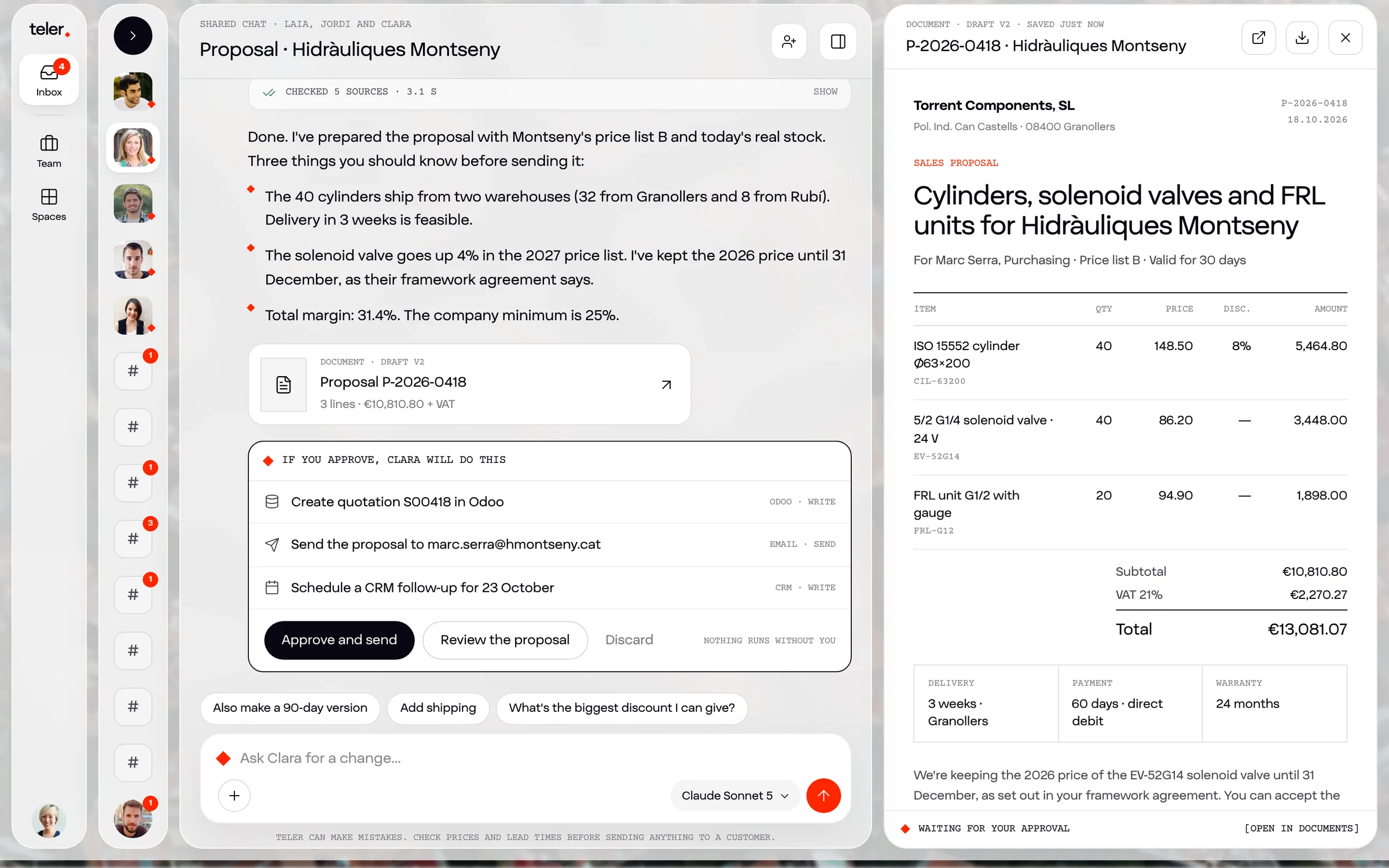
  1. 01One inboxEverything that needs your attention, whether it comes from people, customers or agents.
  2. 02A mixed teamPeople and AI experts with roles, tools and limits, on the same org chart.
  3. 03Screens on demandViews, reports and documents generated when you ask for them.
The Teler demo: Clara has drafted a proposal and is waiting for approval

The everything app for business

Your ERP and your email. Everything else, in Teler.

Every new tool is another subscription, another screen and another thing to keep up to date. In Teler, that work is done by AI experts on top of the systems that stay.

What you can stop paying for

  • CRMHubSpot · Salesforce · Pipedrive
  • Team chatSlack · Teams
  • Tasks & projectsAsana · Trello · Monday
  • Reports & dashboardsPower BI · Looker Studio
  • Proposals & documentsPandaDoc · plantilles de Word
  • HelpdeskZendesk · Freshdesk · Intercom
  • AutomationsZapier · Make · n8n
  • Wiki & knowledgeNotion · Confluence
  • Each tool’s AI assistantCopilot · Gemini

What stays

  • Your ERP, the system of record
  • Email: Outlook or Gmail
  • WhatsApp, if you use it
ToolExamplesIn Teler
CRMHubSpot · Salesforce · PipedriveA customer record that updates with every conversation
Team chatSlack · TeamsChannels with people and experts
Tasks & projectsAsana · Trello · MondayAssignments in the inbox, with an owner and a trail
Reports & dashboardsPower BI · Looker StudioViews generated on request, with live data
Proposals & documentsPandaDoc · plantilles de WordProposals and reports generated from context
HelpdeskZendesk · Freshdesk · IntercomA portal where an expert answers with real data
AutomationsZapier · Make · n8nExperts that work across systems and handle the exceptions
Wiki & knowledgeNotion · ConfluenceOne company context, read by people and agents
Each tool’s AI assistantCopilot · GeminiModel-neutral AI experts across every system

Each company decides what to drop and when. Teler also connects to the tools you want to keep.

Where Teler fits

Teler lives between people and systems

At the top, the team. In the middle, Teler: the workspace, the AI experts and the company context. At the bottom, the ERP and the usual systems, which stay. The numbers show how each part interacts.

Map of Teler in a company. At the top, the team: accounts, admin, sales, purchasing and warehouse, and management, who ask, assign and approve from Teler. On the right, outside the company: customers and shops, suppliers and other companies’ agents. In the middle, Teler: the workspace (inbox, channels, messages, views and mobile), the AI experts (Nil, Clara, Pol, Arnau and Marta) and the company context. Below, the ERP and systems of record, which stay; the experts read and write to them through the agreed path, and a person can go in directly if they want. At the base, Impuls’s five-step rollout. Eight numbered points mark the interactions: person to person, person to expert, expert to person, expert to expert, customer, supplier, external agent and ERP. Who works here the team Teler the work layer Impuls rolls it out Systems of record they stay Rollout Impuls, end to end Outside the company customers, suppliers and their agents AccountsChecks what doesn’t match AdminApproves in the inbox SalesCalls, negotiates, closes Purchasing & warehouseConfirms purchases ManagementAsks and decides ask, assign and approve straight into the ERP, only if they want Teler · the company’s work layer People and experts in one place. It reads and writes through the agreed path, and leaves a trail. Impuls rolls it out Workspace talk, decide, approve 3Inbox 1Team channels Direct messages Generated views Mobile 2 assignments and proposals AI experts do the work and hand it on Nil · assistant Clara · proposals Pol · purchasing Arnau · orders Marta · collections 4 Company context one context for everyone Customers Items and price lists Orders Conversations Decisions and traces Customers and shopsemail, WhatsApp, portal Suppliersorders, confirmations, delivery notes Other companies’ agentstalk to the experts (A2A) 5 6 7 8 writes through the agreed path, with audit reads live data ERP and systems of record They stay. Teler talks to them; it doesn’t replace or migrate them. ERP: Sage, Odoo, Business Central… Bank Microsoft 365 or Google 1Assessmentprocesses, systems and data 2ConnectERP, email, WhatsApp, documents 3Hire expertsthe first ones, with tight limits 4Train the teaminbox, channels and approvals 5Expandmore autonomy, more experts
How people and experts interact
#Who with whomWhere it happensExampleWho decides
1Person with personChannels and messages; @ brings in whoever is neededJordi and Laia review the Grues Penedès offerThe people
2Person to expert“Assign a task”, in the inbox or on mobile“Enter Ferreteria Puig’s order”, to ArnauWhoever assigns it
3Expert to personWork prepared in “For you”, with the reasonPurchase order PO-7790 to Festo, waiting for Núria’s confirmationThe person, always
4Expert with expertThe orchestrator, within the same contextNil brings the history and Clara drafts the offerEach expert’s limits
5Customer with the companyEmail, WhatsApp or portal, in each customer’s threadFerreteria Puig orders on WhatsApp and gets a confirmationThe expert, within limits; otherwise a person
6Supplier with the companyEmail and delivery notes, tied to the purchase orderFesto confirms the lead time and the delivery note is matched to the orderThe person, if it doesn’t match
7Agent with agentAn open protocol between companies (A2A)A customer’s purchasing agent asks Clara for an offerA person approves it
8Experts with the ERPConnectors, always through the agreed pathArnau writes the order to Odoo, with audit entry #4471The expert’s owner
–Person with the ERPDirectly, if they want (dashed line)Accounts closes the month in the ERP, as alwaysThe person

Everyone talks to whoever they need. Experts do the work across systems, and every decision is written down.

AI experts

Digital workers who join your team

They aren’t tools someone opens: they’re colleagues with a trade. Each expert has its tools, its limits and a person responsible for it. You assign it work like any colleague, it runs its scheduled jobs and it leaves a trail of everything it does.
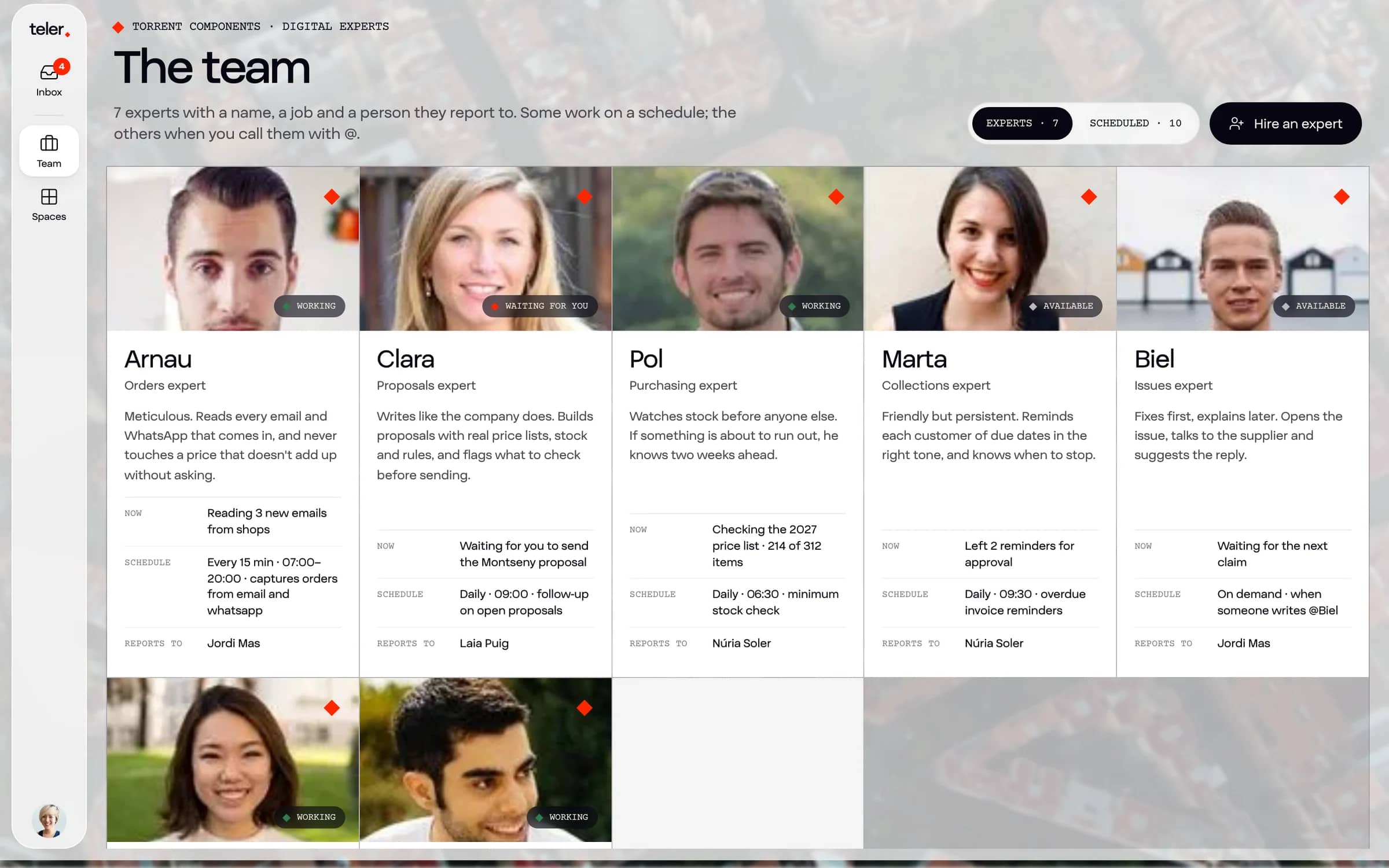
Role and character
Orders expert. Meticulous: never touches a price that doesn’t match without asking.
Reports to
Jordi Mas, who sets its limits and reviews its work.
Tools
Email, WhatsApp and Odoo. Only the ones it needs.
Limits
Writes to Odoo with approval. Limits widen as trust grows.
Scheduled jobs
Captures orders every 15 minutes, 7 am to 8 pm, and writes the daily summary at 6 pm.
On demand
“Enter Ferreteria Puig’s order.” “Which orders are blocked?”
Model
Swappable: the best or the cheapest for each task, in the cloud or on-prem.
Torrent Components’ team in Teler: people and AI experts with today’s work
Torrent Components’ team in the Teler prototype: people and experts, in one place.

Create an expert

Creating an expert is like writing a profile for a new colleague

Describe the job in your own words, give it the tools it needs, set its limits and choose who it reports to. No coding.

02Tools
03Limits
05Model
ArnauOrders expertDraft
Reports to
Jordi Mas · Admin
Tools
—
Limits
Acts with approval
Model
Claude · Cloud, in the EU
Scheduled jobs
Every 15 minutes, 7 am to 8 pm
Typical request
“Enter Ferreteria Puig’s order.”

…

Model-neutral

Any model. On your own server, too.

Each expert uses the model that suits each task. Every call goes through our own gateway: switching models is a setting, not a project.

Cloud, in the EU

The most capable commercial models, served from the EU, for the tasks that need them.

  • Claude
  • GPT
  • Gemini
  • Mistral

On-prem

Open models on your own server or on EU GPUs, when data must not leave the company.

  • Llama
  • Qwen
  • Mistral
  • Gemma
  • DeepSeek

One gateway for everything

  • Routes and fallbacks for each task
  • Limits and cost per expert
  • A log of every call
  • Your data never trains any model

Your ERP

We connect to whatever ERP you run

The ERP is the system of record, and it stays. Teler reads and writes to it through the path we agree, and every write is audited.

  • SAP S/4HANA
  • SAP Business One
  • Microsoft Dynamics 365 Business Central
  • Microsoft Dynamics NAV
  • Sage 200
  • Sage 50
  • Sage X3
  • Odoo
  • Holded
  • a3ERP
  • a3innuva
  • Ekon
  • Oracle NetSuite
  • Infor
  • Cegid
  • Distrito K
  • Ahora
  • Factusol

And any other ERP with an API, a database or exports.

01

API and MCP

For cloud ERPs and those with an open API.

02

Database

Direct reads and controlled writes when there’s no API.

03

Local connector

For the ERP in your office, over an encrypted tunnel.

Integrations

Connect the tools you already use

Pick one or two apps and see what an expert can do with them. These are examples: in every company, workflows follow its own rules and limits.

Pick up to two apps to see what can be done with them.

24 example workflows
  • WhatsApp BusinessOdoo

    WhatsApp orders, straight into the ERP

    1. A customer orders on WhatsApp
    2. Checks price, stock and risk in Odoo
    3. Enters it and confirms to the customer

    Expert: Arnau · orders · Acts with approval

  • OutlookSAP Business One

    PDF orders that arrive by email

    1. Reads the attached PDF
    2. Creates the order in SAP Business One
    3. Asks you if a price doesn’t match

    Expert: Arnau · orders · Acts with approval

  • GmailOdooExcel

    Quotes in minutes, with real data

    1. A quote request comes in
    2. Drafts the proposal with price and stock
    3. You review it and it goes out

    Expert: Clara · proposals · Acts with approval

  • DocuSignBusiness Central

    Proposal signed, order created

    1. The customer signs in DocuSign
    2. Creates the order in Business Central
    3. Tells the warehouse in the channel

    Expert: Clara · proposals · Acts and reports

  • Bank (PSD2)Sage 200

    Bank reconciliation every morning

    1. Reads last night’s transactions
    2. Matches them to Sage invoices
    3. Leaves what doesn’t match in your inbox

    Expert: Marta · collections · Acts with approval

  • HoldedGmailWhatsApp Business

    Chasing overdue invoices

    1. Spots overdue invoices in Holded
    2. Drafts each reminder in the right tone
    3. If they don’t pay, suggests a call

    Expert: Marta · collections · Acts with approval

  • StripeHolded

    Stripe payments, reconciled

    1. Every Stripe payment
    2. Marks the Holded invoice as paid
    3. Weekly summary in the finance channel

    Expert: Marta · collections · Acts and reports

  • OdooOutlook

    Purchases before stock runs out

    1. An item drops below minimum in Odoo
    2. Proposes the purchase with usage and lead times
    3. You confirm and it goes to the supplier

    Expert: Pol · purchasing & stock · Acts with approval

  • Google SheetsSAP Business One

    From sales forecast to purchase plan

    1. Reads the forecast in Google Sheets
    2. Cross-checks SAP stock
    3. Suggests what to buy and when

    Expert: Pol · purchasing & stock · Proposes

  • ShopifyBusiness Central

    Online shop orders into the ERP

    1. An order lands in Shopify
    2. It’s created in Business Central with customer and shipping
    3. The customer gets a confirmation

    Expert: Arnau · orders · Acts and reports

  • WooCommerceSEURWhatsApp Business

    “Where’s my order?”, answered instantly

    1. The customer asks on WhatsApp
    2. Checks status in WooCommerce and SEUR
    3. Replies with the tracking number

    Expert: Customer service · Acts and reports

  • DHLOutlookOdoo

    Delivery issues without chasing anyone

    1. DHL reports a delay
    2. Tells the customer and proposes a new date
    3. Updates the order in Odoo

    Expert: Logistics · Proposes

  • Outlooka3ERP

    Supplier invoices, matched and booked

    1. The invoice arrives by email
    2. Matches it to the order and delivery note
    3. Books it in a3ERP or flags the difference

    Expert: Admin · Acts with approval

  • HubSpotGmail

    Deal ready, proposal drafted

    1. A HubSpot deal moves to “proposal”
    2. Drafts the proposal from the history
    3. Leaves it ready for you to send

    Expert: Clara · proposals · Proposes

  • PipedriveGoogle Calendar

    Sales follow-up that never slips

    1. A proposal sent a week ago
    2. Checks whether the customer opened it
    3. Books you a call in the calendar

    Expert: Jana · follow-up · Proposes

  • LinkedInWebsite & formsSalesforce

    A brief before every visit

    1. You have a visit tomorrow
    2. Gathers who’s who, what they make and what worries them
    3. Leaves it in the Salesforce record

    Expert: Ona · research · Informs

  • Website & formsZoho CRM

    Website leads, qualified

    1. Someone fills in the website form
    2. Qualifies them with what it knows
    3. Creates them in Zoho and proposes a meeting

    Expert: Sales · Acts with approval

  • MailchimpHubSpot

    From campaign to call list

    1. A Mailchimp campaign ends
    2. Sees who opened and clicked
    3. Builds the call list in HubSpot

    Expert: Marketing · Proposes

  • Google AdsGoogle Sheets

    Ad report every Monday

    1. Reads Google Ads spend and leads
    2. Cross-checks against real sales
    3. Tells you what works and what doesn’t

    Expert: Marketing · Informs

  • ZendeskOdoo

    Complaints solved with data

    1. A complaint lands in Zendesk
    2. Checks the order and delivery note in Odoo
    3. Proposes the credit note for approval

    Expert: Customer service · Acts with approval

  • Microsoft TeamsSharePoint

    Meetings with minutes and tasks

    1. A Teams meeting ends
    2. Writes the minutes and assigns tasks
    3. Saves it to SharePoint

    Expert: Nil · assistant · Acts and reports

  • GmailGoogle CalendarGoogle Drive

    An email assistant for the whole team

    1. Sorts email by priority
    2. Drafts replies with the customer’s context
    3. Proposes meetings and attaches what’s needed from Drive

    Expert: Nil · assistant · Proposes

  • ExcelBusiness Central

    The management dashboard, no exports

    1. Every Monday at 8
    2. Sales, margins and blocked orders from Business Central
    3. A generated view, and the Excel if you want it

    Expert: Management · Acts and reports

  • AsanaSlack

    Hours and projects, up to date

    1. Reads Asana tasks and conversations
    2. Flags projects going off track
    3. Drafts the month’s hours invoice

    Expert: Projects · Proposes

Teler connects through APIs, MCP or a connector of its own. If your tool isn’t listed, we connect it during the project.

Expert catalogue

Experts for every sector and every team

A catalogue that grows with every project. The same experts serve many companies: what changes is each one’s systems, rules and limits.

22 experts

  • Finance

    Bank reconciliation

    Matches every transaction to invoices and receipts, and leaves you only what doesn’t match.

    “Reconcile yesterday’s transactions and tell me what’s missing.”

    Banca · ERP

  • Finance

    Collections

    Watches due dates, sends reminders in each customer’s tone and tells you when to call.

    “Who owes us for more than 30 days?”

    ERP · correu · WhatsApp

  • Finance

    Supplier invoices

    Reads invoices, matches them to the order and delivery note, and books them.

    “Which invoices this month don’t match?”

    Correu · ERP

  • Operations

    Order capture

    Reads orders from email, WhatsApp and portal, checks price and stock, and enters them in the ERP.

    “Enter Ferreteria Puig’s order.”

    Correu · WhatsApp · ERP

  • Operations

    Stock & purchasing

    Watches minimums, usage and lead times, and prepares purchases before stock runs out.

    “What will run out this month?”

    ERP · correu

  • Operations

    Logistics & deliveries

    Tracks shipments, flags delays and reschedules deliveries with the customer.

    “Which of today’s deliveries are late?”

    ERP · transportistes · WhatsApp

  • Operations

    Production planning

    Sequences work orders by date, materials and capacity, and flags bottlenecks.

    “Can we ship 500 more units on the 20th?”

    ERP · fulls de producció

  • Operations

    Quality & non-conformities

    Logs issues, traces the cause through batches and suppliers, and drafts the report.

    “Where did Tuesday’s faulty batch come from?”

    Documents · ERP

  • Service

    Technical support

    Answers questions from the datasheets, opens tickets and schedules visits.

    “Which solenoid valve replaces the EV-52G14?”

    Correu · ERP · fitxes tècniques

  • Sales

    Proposals & quotes

    Drafts product or service proposals with real prices, stock and terms, and tells you what to check.

    “Draft the quote for Hidràuliques Montseny.”

    ERP · correu · documents

  • Sales

    Sales follow-up

    Follows up every proposal and tells you when to call.

    “Which proposals are going cold?”

    CRM · correu · agenda

  • Sales

    Public tenders

    Finds tenders that fit, summarises requirements and prepares the paperwork.

    “Any construction tenders in Barcelona this month?”

    Web · documents

  • Operations

    Progress billing

    Prepares monthly progress certificates from measurements and flags overruns.

    “How is the Sabadell site budget doing?”

    Documents · ERP · correu

  • Management

    Market research

    Studies competitors, prices and prospects, and sums it up with sources.

    “Who sells ISO cylinders in Catalonia, and at what price?”

    Web · CRM

  • Management

    Strategy & management

    Dashboards, scenarios and board decks, whenever you ask.

    “What happens to margin if we raise prices 3%?”

    ERP · tot el context

  • Marketing

    Marketing & campaigns

    Plans campaigns, measures them against real sales and suggests what to adjust.

    “Which campaign brought us the most orders?”

    Web · correu · anuncis

  • Marketing

    Content & GEO

    Keeps your website readable for people and buying agents, so AI engines cite you.

    “Do we show up when someone asks ChatGPT?”

    Web · cercadors d’IA

  • Service

    Email assistant

    Sorts email, drafts replies with context and proposes meetings.

    “What do I absolutely have to answer today?”

    Correu · agenda · documents

  • Service

    Customer service

    Answers order status, lead times and questions at any hour, and escalates what’s needed.

    “Which of today’s queries are unanswered?”

    WhatsApp · portal · ERP

  • Sales

    Bookings & events

    Drafts event quotes with menus, allergens and availability, and follows them up.

    “Quote a dinner for 80 people on the 14th.”

    Correu · agenda · ERP

  • Operations

    Contracts & rights

    Reads contracts, extracts terms, territories and conditions, and warns you before anything expires.

    “Which rights expire this year?”

    Contractes · documents

  • Finance

    Project hours & billing

    Gathers project hours, flags overruns and drafts the invoice.

    “Which projects are over budget?”

    Projectes · ERP

How it works

Five layers and one context

Teler’s architecture in five layers. At the top, who works there: the team, customers and suppliers, and other companies’ agents. Layer 1, surfaces: inbox and channels, on-demand views, customer portal and website. Layer 2, AI experts. Layer 3, the company context, shared by people and experts. Layer 4, connectors. Layer 5, systems of record such as the ERP. Governance runs across the first four layers and everything runs on EU infrastructure. Who works here Surfaces AI experts Company context Connectors Systems of record Infrastructure Team · web and mobile Customers and suppliers · email, WhatsApp Other companies · agents (A2A) Inbox and channels On-demand views Customer portal Website for people and agents assignments and approvals Role and character Tools and limits Scheduled jobs Memory Orchestrator read and write Customers and contacts Items and price lists Orders and documents Conversations Decisions and traces In JSON, Markdown and vectors · one context for people and experts sync MCP and API ERP Email and WhatsApp Calendar and documents Bank read and write through the agreed path ERP: Sage, Odoo, Business Central, Holded, a3, SAP Business One Microsoft 365 or Google · bank · company files All in the EU: data in the EU and models through the Resclosa gateway, interchangeable Governance Permissions per expert Spending limits Approvals in the inbox Audit of every action Cost per expert Instant pause Applies to every layer
01

One context

People and experts work with the same information. What one expert learns, the whole team benefits from.

02

The ERP rules its own domain

Quantities, invoices and accounting stay in the ERP. Teler doesn’t replace or migrate it.

03

Interchangeable surfaces

The inbox, the portal or the website can be redesigned without touching data or experts.

The journey of a task, step by step

An order arriving on WhatsApp at Torrent Components. People only see what their decision needs.

An order’s journey in six steps and five lanes. 1, it comes in: Ferreteria Puig sends the order on WhatsApp. 2, the expert Arnau reads it. 3, he checks Odoo: price list, stock and risk. 4, he prepares the order and checks its limits. Within limits, he enters it himself; if not, it goes to Jordi’s inbox, who decides in one click. 6, Arnau writes it to Odoo with the reason and confirms to the customer on WhatsApp. Every step is written to the audit log. 1In 2Understand 3Check 4Propose 5Decide 6Execute Customers and suppliers AI experts People Systems Trail Ferreteria Puig order on WhatsApp Arnau reads it items and quantities Checks Odoo price list B, stock, risk Prepares the order and checks the limits Jordi decides approves in one click Writes to Odoo with the reason Confirmation to the customer, on WhatsApp new message query price and stock outside limits within limits, does it alone approved Every step is written down: what, who, when and why · Audit #4471

Dashed line: if the order is within the limits Jordi has set, Arnau enters it himself and explains it in the channel. Solid line: if a price doesn’t match or a limit is exceeded, the decision lands in the inbox with all the work done.

People decide; experts execute

Each type of action has an autonomy level, set by the person responsible for the expert. The level rises as the expert earns trust.

  1. 01

    Informs

    The expert flags it and the person acts.

    ExampleMarc Serra has opened the proposal again.

  2. 02

    Proposes

    It prepares the work and the person chooses.

    ExampleTwo options: 60 days, or 90 with a 2% surcharge.

  3. 03

    Acts with approval

    It gets everything ready and the person confirms in one click.

    ExamplePurchase order PO-7790 to Festo, waiting for Núria’s confirmation.

  4. 04

    Acts and reports

    It does it alone, within limits, and explains what it did.

    ExampleSummary of the day’s orders in the #orders channel.

Built-in controls

  • Permissions per expert and per tool
  • Spending limits
  • Approvals in the inbox
  • Audit of every action
  • Cost per expert
  • Instant pause

Data, in a language built for agents

Today, information lives on screens, in spreadsheets and in people’s heads. In Teler every fact, document and decision is stored in a format an agent can read and a person can understand.

Context graph around the customer Grues Penedès: their orders, which contain items and prices; the conversations they write; the proposals they receive; and the decision on their terms (90 days with a 2% surcharge), approved by Jordi Mas. Grues Penedès customer Orders Items and price lists Conversations Proposals Decision 90 days, with 2% Jordi Mas buys contains writes receives terms approved by

Facts, in JSON

{
  "client": "Grues Penedès",
  "termini_dies": 90,
  "recarrec": 0.02,
  "impagats_4_anys": 0,
  "aprovat_per": "Jordi Mas"
}

Knowledge, in Markdown

## Payment terms
Customers with no late payments in 3 years: up to 90 days, with a 2% surcharge.

Decisions, with a trace

Who, what, when and why: approved by Jordi Mas at 09:58, with the payment history as the reason. The data belongs to the company and exports in open formats.

01

All in the EU

Data and models in the EU. GDPR by design, on the same stack we already use for client projects.

02

Each company, isolated

Row-level isolation in the database and separate indexes per company. Your data never trains any model.

03

No vendor lock-in

Your data is yours and exports in open formats. The model is whichever fits best.

The product
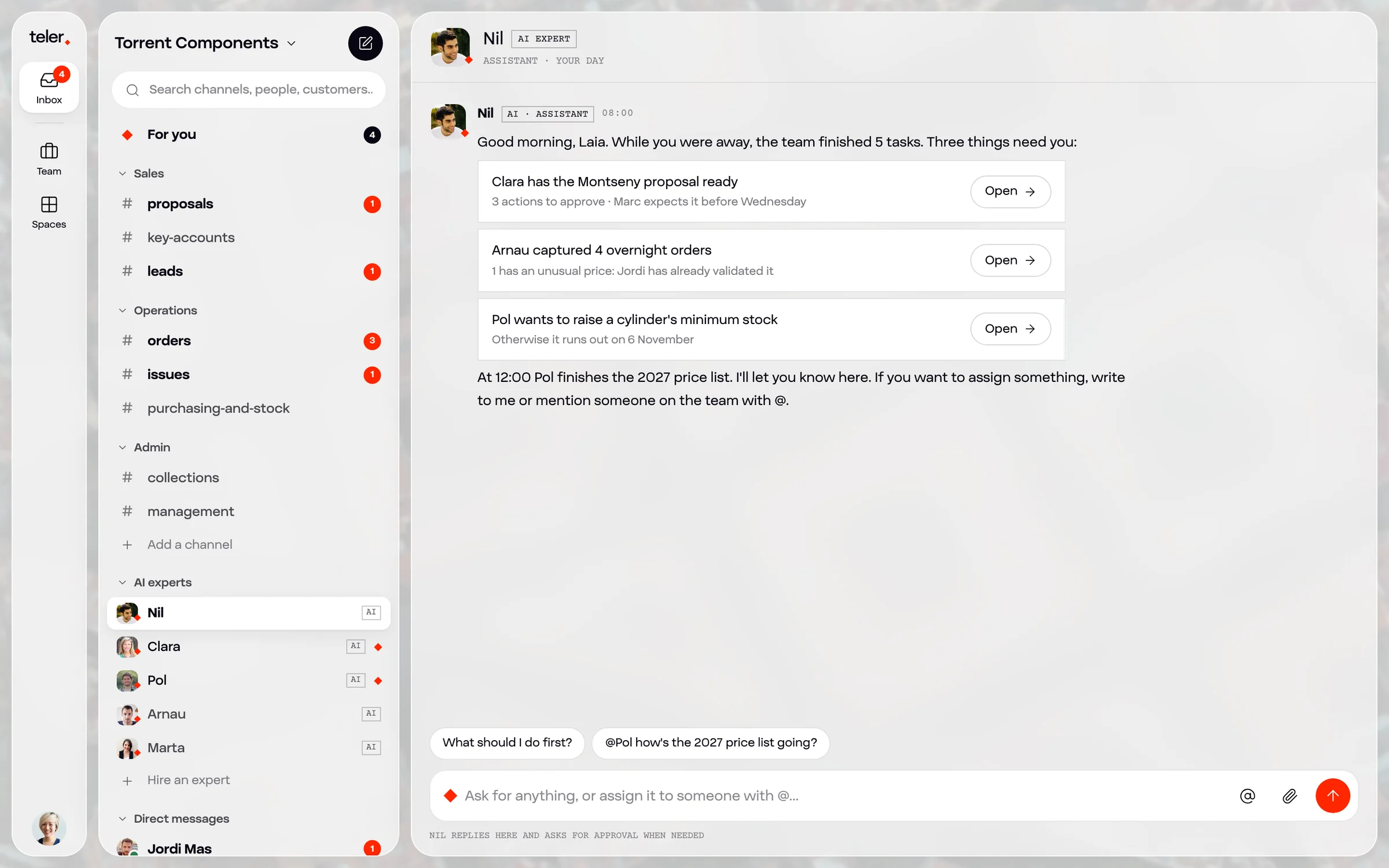
The day starts in the inbox

  1. 01For youWhat’s waiting for your decision, in order of priority.
  2. 02Team channelsSales, Operations and Admin, with people and experts in the same thread.
  3. 03AI expertsHired like any team member, and one message away.
  4. 04Customers and suppliersEmail and WhatsApp land here, linked to each customer’s record.
  5. 05The conversationJordi asks; Nil answers with the payment history and brings in Clara.
  6. 06DoneClosing a task is one click, and it’s recorded.
The Teler inbox at Torrent Components, with channels, customers and AI experts

Screens are generated when you need them

When Núria wants to check stock, she asks. Teler opens a view built for that question, with live data from the ERP. When she’s done, it closes. Every write to the ERP leaves a trail: what changed, who approved it and why.
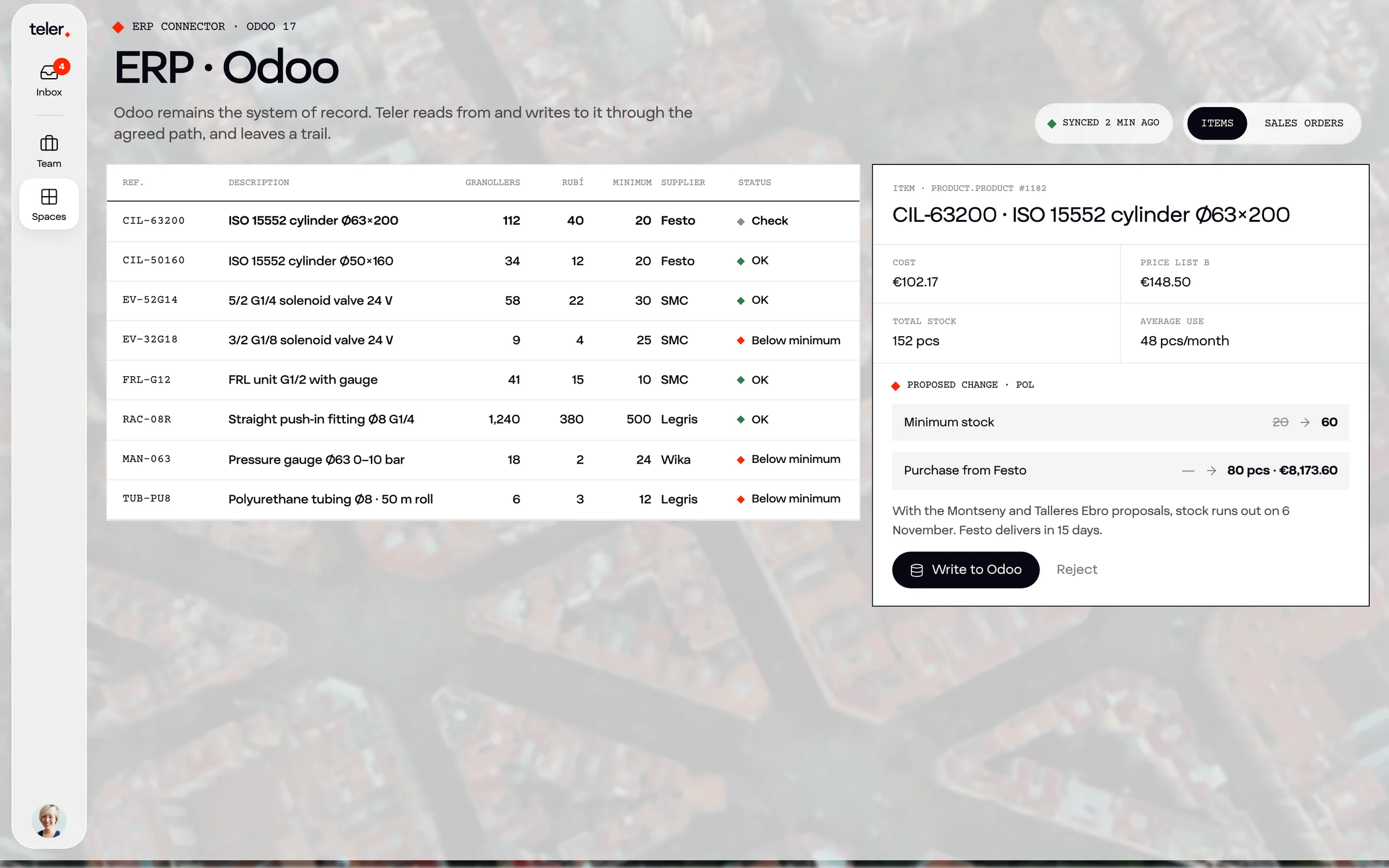
A stock view generated in Teler with live Odoo data
  1. 01

    Ask

    “How are we doing on cylinder stock?”

  2. 02

    Query

    The expert reads Odoo through the agreed path.

  3. 03

    View

    A screen is generated for that question.

  4. 04

    Decide

    Núria confirms the purchase from Festo.

  5. 05

    Trail

    It’s written to Odoo, with an audit entry.

What changes in the company

Word, Excel and PowerPoint files still exist as delivery formats. What changes is where the work happens.

TodayWith TelerThe person
Email and WhatsApp, each in its own appOne inbox: every message, with the customer and their contextAnswers what needs judgement
Spreadsheets exported and cross-checkedLive data and views generated on requestAsks and decides
Documents and decks made by handProposals, reports and decks generated from contextReviews and sends
A CRM updated when someone has timeA customer record that updates with every conversationCalls and negotiates
Team chat in Teams or SlackChannels with people and expertsCoordinates
A portal or forms for customersA portal where an expert answers with real dataHandles the exceptions
Month-end reportsAnswers and dashboards on the spotActs
ERP: Sage, Odoo, Business Central…Stays. Teler reads and writes to it through the agreed pathGoes in when they want, not to retype

A working day

A day at Torrent Components

A pneumatic components distributor with warehouses in Granollers and Rubí: 25 people, Odoo 17 and a team of AI experts. The company is a sample; every scene comes from a real client case.

  1. Arnau · orders

    Has read 23 emails and 9 WhatsApps from overnight. 14 orders entered in Odoo; 2 sent to the inbox because a price doesn’t match.

    Odoo · inbox
  2. Marta · collections

    Has reconciled the bank. Three bounced direct debits: the reminders are ready for Jordi to send.

    Bank · inbox
  3. Nil & Clara · sales

    Grues Penedès asks for 90 days. Nil brings the payment history and Clara drafts two options.

    Conversation
  4. Pol · purchasing

    Cylinder CIL-63200 drops below minimum. He leaves the Festo purchase waiting for Núria’s confirmation.

    Odoo · audit
  5. Nil · heads-up

    Marc Serra opens the proposal again. Nil tells Laia: call him now, it’s on his mind.

    Inbox
  6. Management

    “How are we doing this month versus last year?” A view generated with sales, margins and blocked orders.

    On-demand view
  7. Arnau · summary

    Daily summary in the #orders channel: 38 tasks done and both exceptions resolved.

    #orders channel

Nobody opened the ERP to retype anything. The team spent the day deciding, negotiating and calling.

Live this day in the demo

Already working, in pieces

Every Teler module comes from a project a client has paid for and uses

Teler brings them together in one system.

In use

AI-powered CRM

Four companies in different sectors work with custom CRMs built by Impuls.cat.

In user testing

Contract reading

950 audiovisual rights contracts, from 2005 to 2026, turned into searchable data. Seven agents planned.

In use

Industrial content & GEO

Technical content and structured data so AI engines find and cite an industrial manufacturer.

In use

Conversational assistants

Round-the-clock support and lead qualification with the company’s knowledge, in healthcare.

In progress

Agentic websites & back office

Websites with a CMS and their own agents, and the Teler back office at a coworking client.

Proposed

Layers on top of the ERP

Orders and a B2B portal on Sage, and an invoice agent on Business Central.

The rule: no module is built to fill a catalogue. It’s built when a client pays for it and uses it.

Why now

The shift, in numbers

≈ 1,200

app switches a day per person. Almost 4 hours a week just to get back on track.

HBR, 2022

2 min

between interruptions: meetings, emails or messages.

Microsoft, Work Trend Index 2025

60%

of Spanish SMEs still process invoices by hand.

Sage and Afi, 2026

10,000+

public MCP servers, the open standard for agents to use tools.

Linux Foundation, Dec 2025

−25%

the S&P software and services index between 12 January and 23 February 2026, after the launch of Claude Cowork.

DeepLearning.AI, February 2026

20%

of Spanish companies with 10+ people use AI; 80% still don’t.

Eurostat, December 2025

The very notion of business applications may collapse in the agent era: the logic moves to the AI layer, which updates the databases directly.
Satya Nadella, Microsoft · December 2024
By 2028, a third of user experiences will shift from native applications to agentic front ends.
Gartner · August 2025

Who’s in the game, and what an SME is missing

They all apply AI to the system of an era when people worked in front of screens. Teler starts from the other side: agents do the work and people are there to decide.

CategoryExamplesWhere the AI worksWhat an SME is missing
Office assistantsMicrosoft 365 Copilot, Gemini in Google WorkspaceInside Word, Excel, Outlook or GmailPeople still open each app and bridge them all.
Agents inside the ERPSage Copilot, SAP Joule, Business Central agentsInside each vendor’s ERPEach vendor works within its own walls; email, WhatsApp and Excel are left out.
Agent platformsSlack with Agentforce, OpenAI Frontier, Microsoft Agent 365On top of each giant’s ecosystemThey need a technical team to deploy, and no one rolls them out alongside the SME.
Single-role workers11x, ArtisanIn one isolated process, such as prospectingOne role on its own, with no shared space with the team and no company context.
Automationsn8n, Make, ZapierIn fixed flows between appsRules set in advance; when an exception comes up, it goes back to a person.
TelerImpuls.catIn an inbox where people and experts work, across every systemVendor- and model-neutral, built for SMEs and rolled out alongside the client.

Categories describe where the AI works in each case, not the quality of each product.

The risk

Gartner expects more than 40% of agent projects to be cancelled by the end of 2027, due to costs, unclear value or lack of control. Teler puts context, limits and a responsible person for each expert at the centre.

Roadmap

Above all, a framework for the AI era

Today Impuls.cat builds each expert. Tomorrow partners and companies themselves will build them, with the same tools we use.

Teler as a framework. At the top, experts and apps from Impuls.cat (from 2026), from partners (from 2027) and from each company (from 2028). They are built with a kit: expert SDK, MCP, A2A, templates and generative views. Everything runs on Teler Core. On the right, two companies talk agent to agent: Torrent Components’ sales expert sends an offer and the customer’s purchasing agent replies with an order. Experts and apps by Impuls.cat from 2026 Experts and apps by partners from 2027 Experts and apps by each company from 2028 are built with Build kit Expert SDK MCP A2A Templates Generative views runs on Teler Core Inbox · experts · context · connectors · governance · EU infrastructure Between companies, agent to agent Torrent Components sales expert in Teler Industrial customer purchasing agent in its own tool offer order Two companies’ agents talk to each other over an open protocol (A2A, Linux Foundation), and people sign off where needed.
01

Open to build on

An expert kit, MCP for tools and A2A to talk to other companies’ agents: open standards from the Linux Foundation.

02

Governed by default

Everything built on it inherits the core’s permissions, limits, approvals and audit.

03

Model-neutral

Each expert uses the model that suits it, always through the same gateway.

The product grows inside real projects

A build partner is a company that commissions a project from us below market price. In return, the software it produces becomes part of Teler.

The build partner cycle: a company commissions a project from Impuls.cat below market price; the software is generalised into a Teler module (expert, connector or view); the module joins the catalogue; the next company switches it on and adapts it, and brings its own process, so the cycle starts again. Build partner company a process that costs it hours Project with Impuls.cat below market price Teler module expert, connector or view Teler catalogue available to everyone Next company switches it on and adapts it commissions is generalised is added switches it on and brings its own process: the catalogue grows with every customer

The client keeps

  • Its data, which never leaves its space and exports whenever it wants.
  • The processes and rules that make it different. They’re never reused.

Teler keeps

  • The software: experts, connectors and views, generalised for any company.
  • Each expert’s pattern, so the next client doesn’t start from scratch.

From projects to a framework, in four stages

  1. 2026 · now

    Build partner projects

    AI layers on each client’s ERP. Every project leaves a reusable module.

  2. 2027

    Teler Core

    Inbox, experts, context, connectors and governance on one base. Commercial launch; build partners become the first customers.

  3. 2027–2028

    Catalogue & partners

    Experts by function and verticals by sector. “Hire an expert” from the catalogue.

  4. 2028 onwards

    Open framework

    A kit to build experts, connectors and views on Teler, and agents from different companies that talk to each other.

Indicative timeline. Each stage opens when the previous one works with real clients.

Build partners

We’re looking for companies that want to build it with us

What you bring

  • A process that costs you hours today: orders, invoices, proposals or collections.
  • Access to your systems: ERP, email and documents, through the path we agree.
  • A responsible person who decides with us and is the first user.

What you get

  • The system rolled out below market price.
  • Founder terms when Teler launches.
  • A direct say in the product and the roadmap.
  • Your data and your processes, which are yours and are never reused.
Teler will be the place where the work gets done. We’re building it with the people who do that work every day.
Guillem ArbósFounder & CEO, Impuls.cat

Questions

What people usually ask.

What is an AI expert?

A digital worker that joins your team. It has a trade (orders, proposals, purchasing, collections…), specific tools, limits and a person responsible for it. You assign it work like a colleague, it runs scheduled jobs and it leaves a trail of everything it does.

Is it just another SaaS?

No. Teler is the work layer that replaces many of the tools you pay for separately today. Your ERP and your email or WhatsApp stay; the rest of the work is done by AI experts inside Teler, following your rules.

Do I have to change my ERP?

No. Your ERP stays: it’s the system of record. Teler reads and writes to it through the path we agree (SAP, Business Central, Sage, Odoo, Holded, a3…) and every write is audited.

Which AI models does it use? Can they run on-prem?

Whichever fits each task best: Claude, GPT, Gemini or Mistral in the EU cloud, or open models such as Llama, Qwen or Gemma on your own server. Everything goes through a gateway, so switching models is a setting.

Where is my data?

In the EU. Each company is isolated in the database and your data is never used to train any model. It’s yours and it exports in open formats.

What if an expert makes a mistake?

That’s why nothing runs without a responsible person. Every expert has limits, important actions wait for your approval and everything goes into the audit log. And you can pause it instantly.

How much does it cost?

Right now we work with build partners: we roll Teler out on one specific process, with a project fee and a monthly subscription, below market price. We’ll give you a figure once we know which process you want to solve.

Does the demo use real data?

No. Torrent Components is a sample company. The scenes come from real client cases, but the names and figures are made up for the demo.

Who is behind Teler?

Impuls.cat, an AI consultancy in Barcelona (Norrsken House) that builds CRMs, agents and websites for B2B SMEs. Teler brings together what we already do in client projects.

See how a mixed team works.

A sample company, five minutes and just your email.

Try the demo
Sources

Consulted in October 2026. Market figures come from the sources cited; Torrent Components and its data are an illustrative example.

  1. HBR (Murty, Dadlani and Das), app switching, via Canadian Underwriter · Aug 2022
  2. Microsoft, The 2025 Annual Work Trend Index: The Frontier Firm is born · Apr 2025
  3. Portal ERP, Sage adds AI agents (includes the Sage and Afi study) · Apr 2026
  4. CX Today, Satya Nadella on the BG2 podcast about agents and SaaS · Dec 2024
  5. Gartner, 40% of enterprise apps with agents by 2026 · Aug 2025
  6. Constellation Research, Microsoft Agent 365 and agents in Word, Excel and PowerPoint · Nov 2025
  7. Microsoft Learn, Business Central Sales Order Agent · GA Nov 2025
  8. CIO, SAP Joule Work and the Autonomous Suite agents · Oct 2026
  9. No Jitter, Microsoft 365 Copilot hits 20 million seats · May 2026
  10. Reworked, Slack as the agentic OS at Dreamforce · Oct 2025
  11. ContentGrip, OpenAI Frontier for enterprise agents · Feb 2026
  12. METR, Measuring AI ability to complete long tasks · Mar 2025
  13. Epoch AI, LLM inference price trends · Mar 2025
  14. Anthropic, MCP and the Agentic AI Foundation (Linux Foundation) · Dec 2025
  15. DeepLearning.AI, Claude Cowork plugins and the SaaS sell-off · Feb 2026
  16. Europa Press, Eurostat data on AI use in companies · Dec 2025
  17. Outlook Business, Gartner on cancelled agent projects · Jun 2025
  18. Virtualization Review, MIT NANDA’s GenAI Divide report · Aug 2025
  19. Google Research, Generative UI · Nov 2025
  20. Ashu Garg (Foundation Capital), AI’s trillion-dollar opportunity: context graphs · Dec 2025
  21. Latent Space, Andrej Karpathy: Software 3.0 and the autonomy slider · Jun 2025
  22. Foundation Capital, A System of Agents brings Service-as-Software to life · Oct 2024
  23. BleepingComputer, the A2A protocol moves to the Linux Foundation · Jun 2025